SUBSMART
A mobile app (with a web back end Admin Panel) to enable AMBC Limited Bricklayers and subcontractors to provide onboarding accreditations, book in lifts and submit lift completion for payment. Management of bricklaying jobs will be key to enabling AMBC to maintain Bricklayers compliance, assess and approve work to pay according to lift completion.
Role
Product (UX/UI) Designer
Client
AMBC Ltd.
Platform
Web & mobile
Toolkit
Figma, Monday.com.
My role
Led an end to end design process from research to implementation, collaborating with Product manager, Graphic designer, QA engineer, Developers and managing client meetings.
The impact
Streamlined the AMBC process by digitizing operations, enabling efficient site record management, subcontractor allocation, and invoice processing resulting in substantial time savings and improved operational efficiency.
Project kickoff
The project began with initial online meeting with client where we briefly discussed and understand the key areas & stakeholders in the business.
Design brief
To provide a simple and easy to use solution for bricklayers to track their work progress for payment. Currently this is all done via pen and paper, this will be an intuitive solution for AMBC with the potential for them to white label this to other bricklayer and construction companies in the future.
Deep diving into client business
A questionnaire was created for the client in order to gather required information about the working of current business, problems faced in the current workflow, understanding target users etc.
User pain points
Manual onboarding
ID checks, CSCS checks (and ongoing management) can be time consuming and unreliable.
Inaccuracy
The current process lacks transparency for all parties and possible inaccurate.
Difficult for bricklayers
It can be difficult when bricklayers leave or join, particularly in calculating their payments.
Payment takes to long
Manual nature of the calculation, and also the calculation of CIS and getting UTRs can be painful.
Project goals
Streamline admin work
To streamline the admin work for AMBC online without having to manually work out outstanding work.
Sign offs and approval
Breaking each lift within a job down into increments (25% ,50%, 75% and 100%) once the completion level is marked.
Updated information
Ensure all bricklayers on site are compliant and have their accreditations up to date (ID checks, CSCS checks).
Intuitive design
Ensure the app is simple enough for the bricklayers to use as they’re not good with technology.
SUBSMART
A mobile app (with a web back end Admin Panel) to enable AMBC Limited Bricklayers and subcontractors to provide onboarding accreditations, book in lifts and submit lift completion for payment. Management of bricklaying jobs will be key to enabling AMBC to maintain Bricklayers compliance, assess and approve work to pay according to lift completion.
Role
Product (UX/UI) Designer
Client
AMBC Ltd.
Platform
Web & mobile
Toolkit
Figma, Monday.com.
Design phase
After successfully discussing every user flow with client and assuring that we have covered all the required information, the next step was to start design phase .
Wireframes
Design phase started with wireframes and exploring multiple solutions. Feedback was noted from client and changes were made as per the requirement.
Visual design & branding
I created a colour palette with 1 primary, 2 secondary and 3 neutral colours. The choice for typography has fallen on Poppins font with a decent x-height for legibility. Created a components of header, tiles, footer, buttons and icons.
With those elements added to my low fidelity wireframes, I made my way into high-fidelity designs.
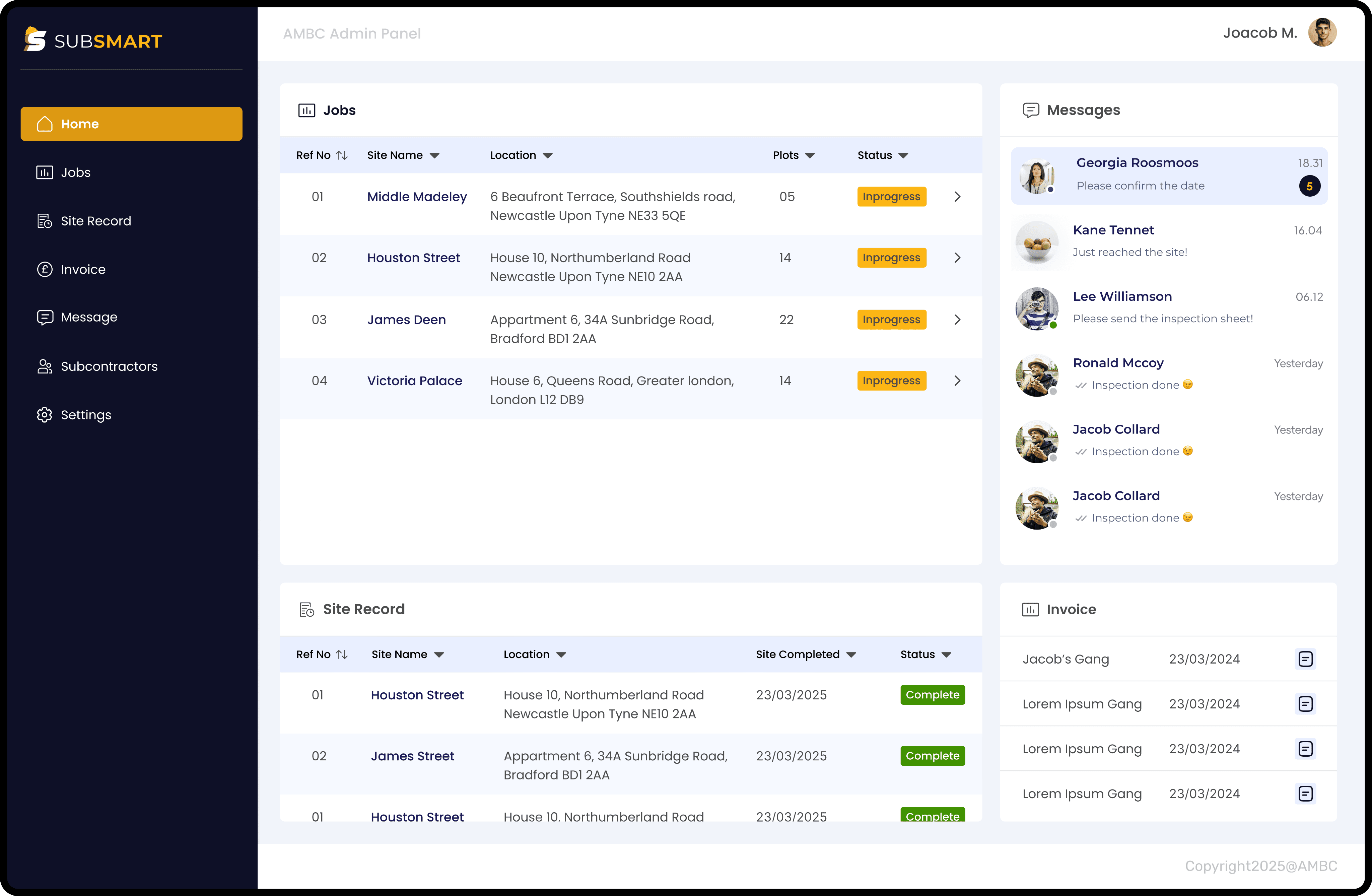
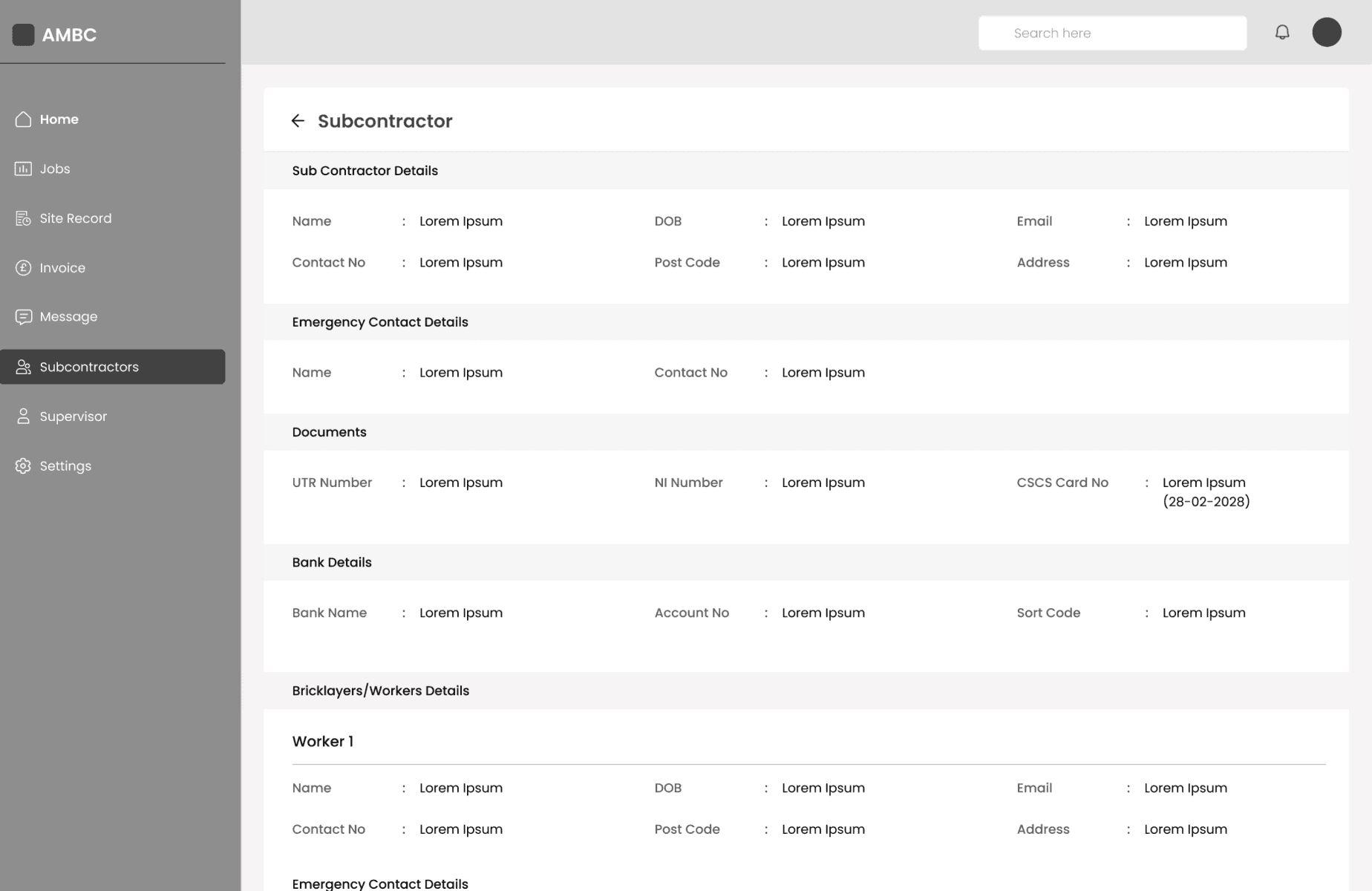
Clear visibility of key areas of business to streamline the admin work.
Managing jobs on paper manually and keeping an eye on all aspects of business was time consuming and hard to remember everything.
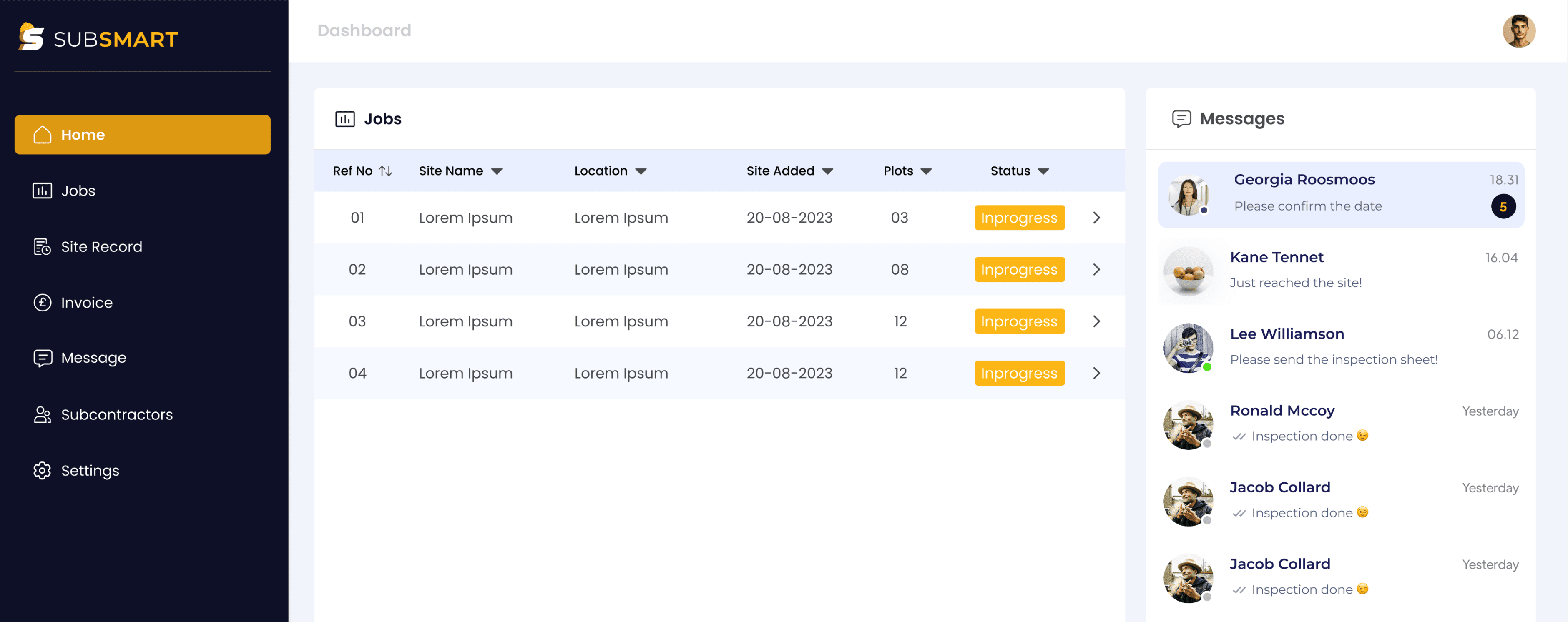
With Subsmart, admin can now easily manage and track all the jobs, messages, site records and invoices on the main dashboard of the web app.
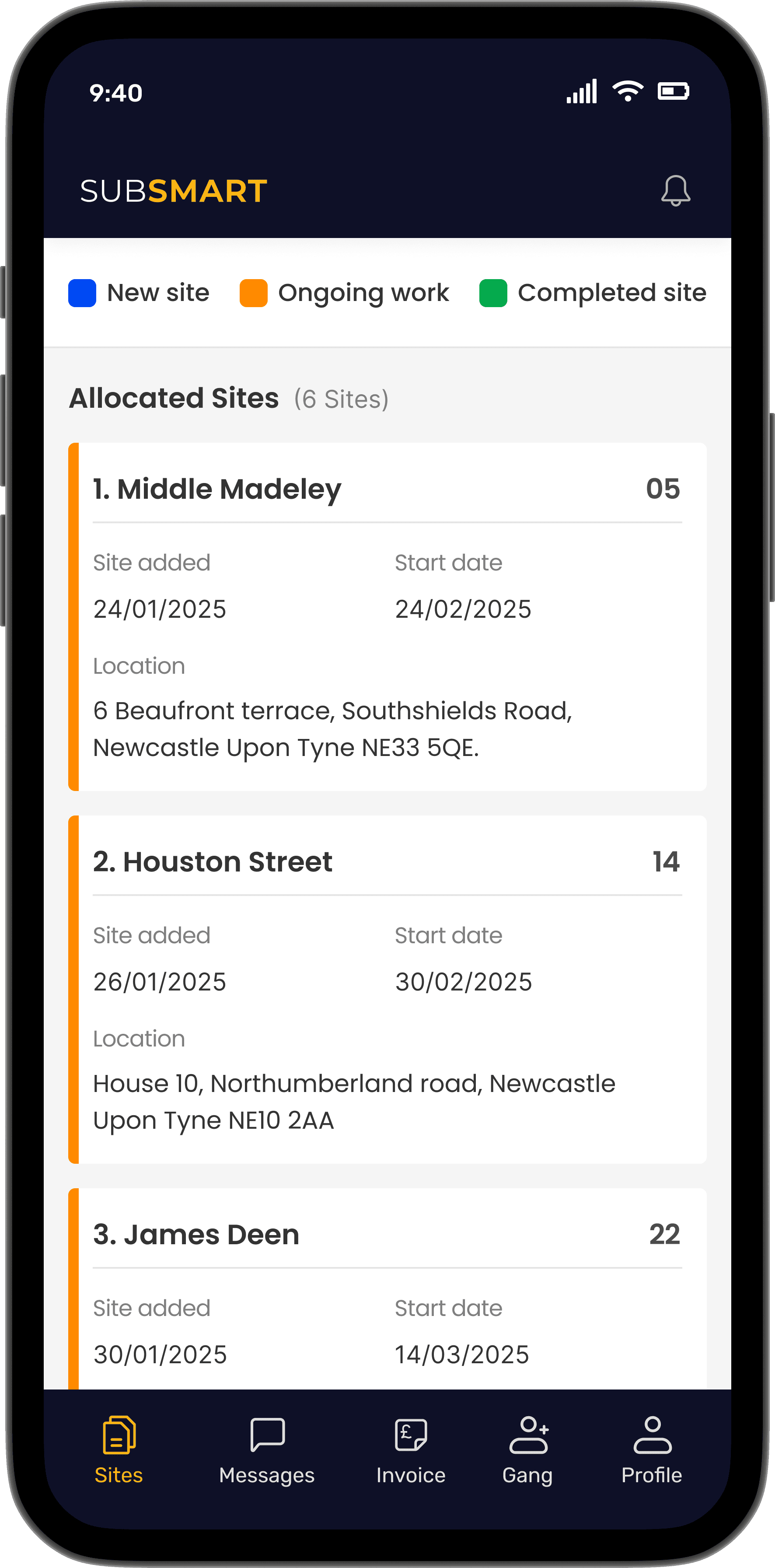
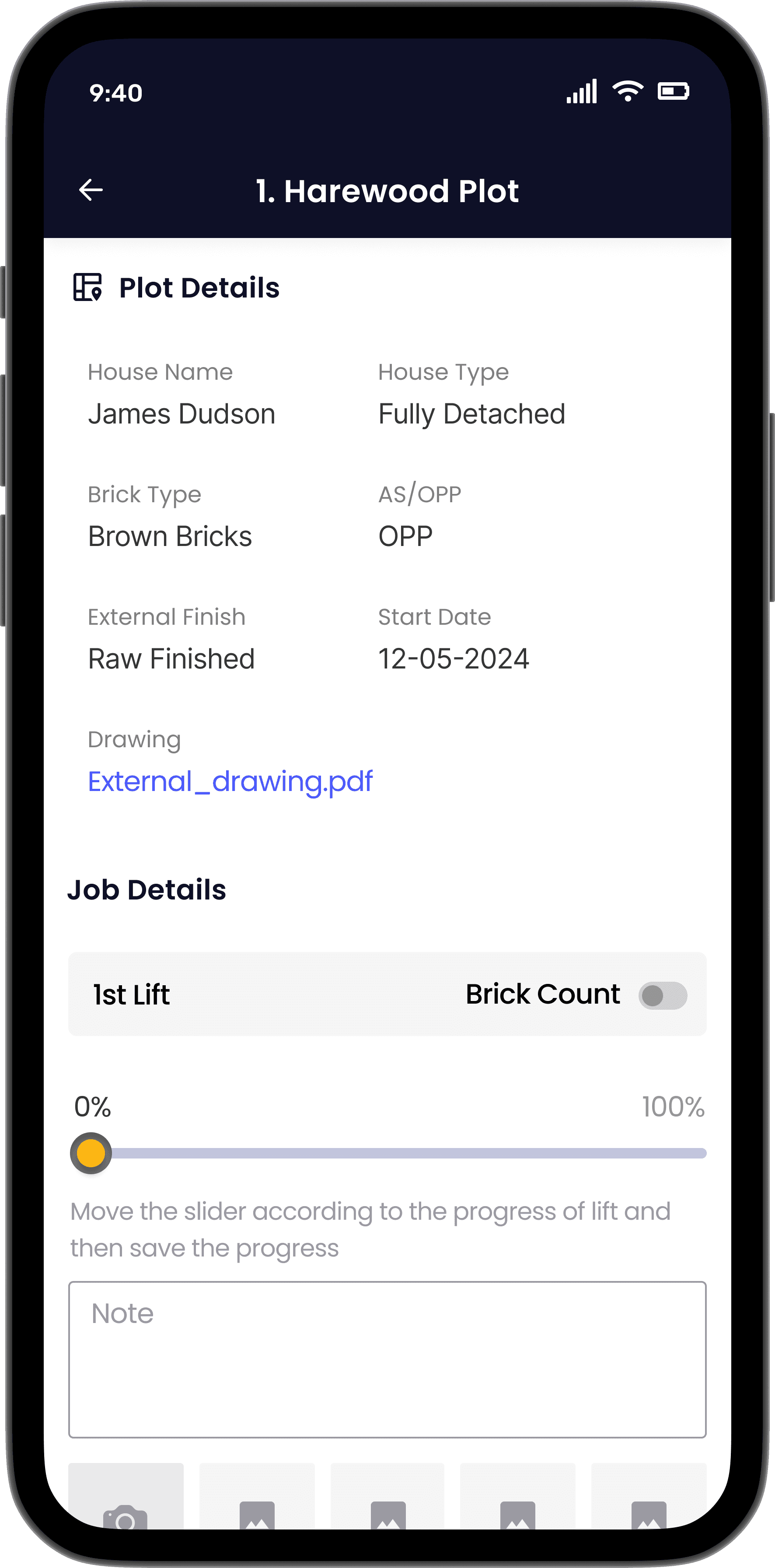
No more pen & paper required.
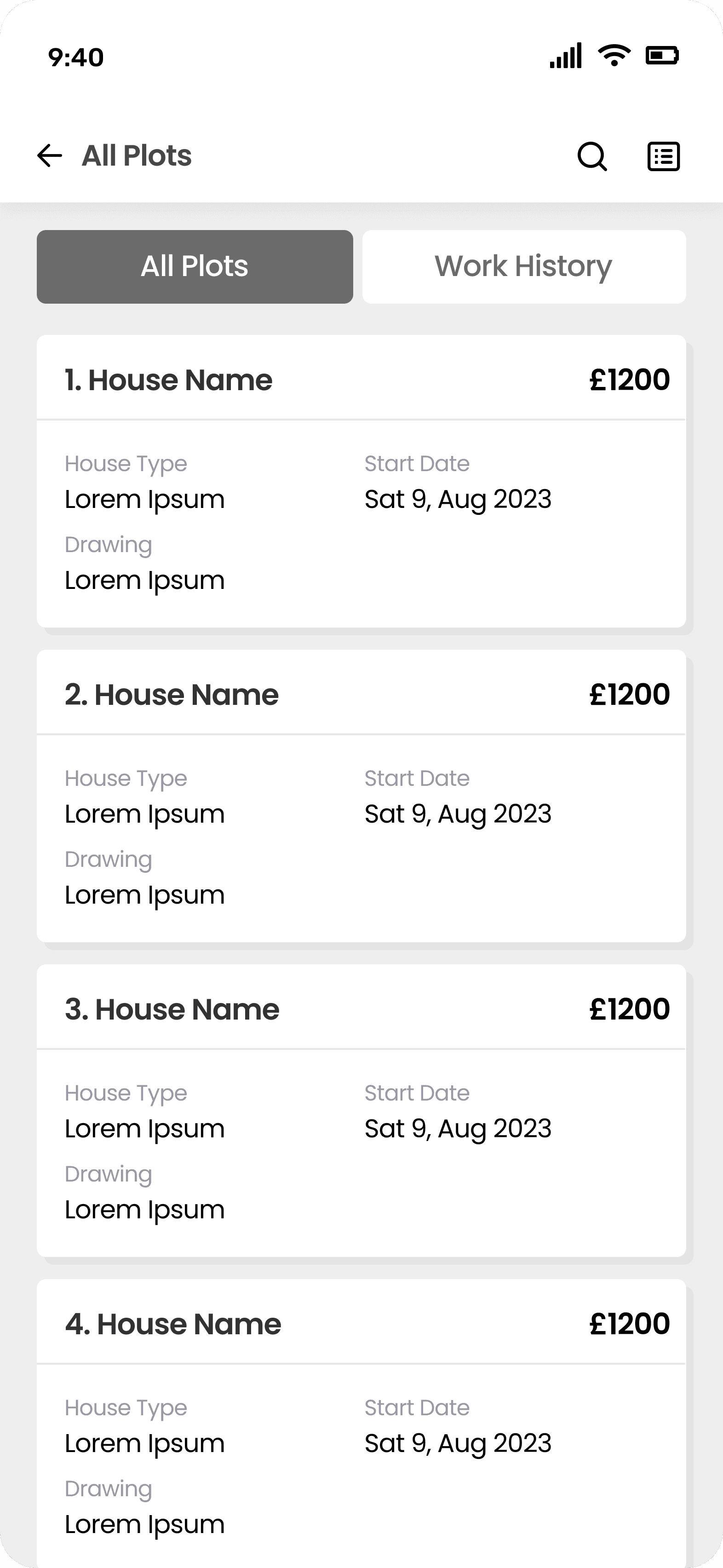
Bricklayers now can easily get access to the new sites added and can effortlessly mark the work progress without noting down on any paper.
This way they can keep the track of work done and record the completed work on site.
Hi-Fi designs
After successful session on wireframes and colour palette, I started working on designing Hi-Fi designs.
Internal QA testing
Overall, internal figma testing was quite satisfying. All the flows were working as expected and it was also made sure that the UI design is pixel perfect.
Figma prototype was tested with Bricklayers and Supervisor and received positive feedback. There were minor tweaks which were updated in design.
Design handover
The handover document was created with the recordings explaining each and every functionality in the flow. The prototype was also added which majorly helped in the handover meeting as it was easier to explain the process to the dev team.
A separate handover document was created with added annotations and explanation of each screen. The project handover was made in four phases covering all the core features of Subcontractors mobile app, Supervisors mobile app and Admin panel.
Key takeaways
Seek out feedback early and continually
The trouble with most of us is that we would rather be ruined by praise than saved by criticism. Keeping the stakeholders/users in loop and testing solutions in whatever form (paper, low-fi or hi-fi) as early as possible saves ample amount of time and re-work.
Simplicity is strength
As a designer, we are often lured by attractive, trendy and out of the box designs. But, we must always remember the ‘why’. The primary goal is to understand the user, their problems and then come up with a design that solves it.
Prioritize
Create a design strategy before starting any new project. This helps deal with out-of-scope requests that could potentially derail the project and helps deliver a quality product in time.
My role
Led an end to end design process from research to implementation, collaborating with Product manager, Graphic designer, QA engineer, Developers and managing client meetings.
The impact
Streamlined the AMBC process by digitizing operations, enabling efficient site record management, subcontractor allocation, and invoice processing resulting in substantial time savings and improved operational efficiency.
Project kickoff
The project began with initial online meeting with client where we briefly discussed and understand the key areas & stakeholders in the business.
Design brief
To provide a simple and easy to use solution for bricklayers to track their work progress for payment. Currently this is all done via pen and paper, this will be an intuitive solution for AMBC with the potential for them to white label this to other bricklayer and construction companies in the future.
Deep diving into client business
A questionnaire was created for the client in order to gather required information about the working of current business, problems faced in the current workflow, understanding target users etc.
User pain points
Manual onboarding
ID checks, CSCS checks (and ongoing management) can be time consuming and unreliable.
Inaccuracy
The current process lacks transparency for all parties and possible inaccurate.
Difficult for bricklayers
It can be difficult when bricklayers leave or join, particularly in calculating their payments.
Payment takes to long
Manual nature of the calculation, and also the calculation of CIS and getting UTRs can be painful.
Project goals
Streamline admin work
To streamline the admin work for AMBC online without having to manually work out outstanding work.
Sign offs and approval
Breaking each lift within a job down into increments (25% ,50%, 75% and 100%) once the completion level is marked.
Updated information
Ensure all bricklayers on site are compliant and have their accreditations up to date (ID checks, CSCS checks).
Intuitive design
Ensure the app is simple enough for the bricklayers to use as they’re not good with technology.
Research and discovery
Six people were interviewed: 4 Bricklayers, 1 Gang leader, 1 Site supervisor. User interviews were conducted on site of a client.
Questions asked to bricklayer, gang leader and site supervisor
1
What is the current process to complete lifts?
2
Do all the bricklayers work on same plots of the site?
3
What are the common problems faced on site?
4
Who is responsible for document checks?
5
What documents are required to work on site?
6
How is the progress confirmed on site?
7
How often you use your phone on site?
8
Is it easy to operate phone with gloves on?
Survey outcome
Manual process
Bricklayer record the completion of work on paper. It’s difficult to handle paper copy during bad whether or due to the wet site conditions.
Time consuming
Time consuming for supervisor to mark and approve work done.
Manual process of calculation and creating invoice.
Document check
Hard for gang leader to keep record of all bricklayers. Often need to check expiry of all the bricklayers document and update information with Admin.
User Personas & Scenarios
Created 2 primary personas & scenarios based on the research and survey outcome to keep design decision user centric.
Key features
Bricklayers/Subcontractors (Mobile App)
Profile creation
Ability to create and add gang members
Overview
Overview of jobs & workers allocated to different jobs/site
Job submission
Ability to submit lifts / jobs for approval.
Invoice procession
Ability to create invoice and send it to admin for processing.
Site Manager (Mobile App)
Delete profile
Ability to remove subcontractor profile.
Overview
Overview of jobs & workers allocated to different jobs/site
Approval
Ability to review & approve completed lifts/jobs
Amend progress
Ability to amend progress of lifts/jobs submitted.
Admin panel (Web app)
Profile creation
Ability to create profile for subcontractors and bricklayers
Expiry reminders
CSCS, UTR and CIS check and ability to send reminders when expiring
Property details
Ability to input a plot number, input price list for jobs, the total cost for house build
Create gangs
Ability to create “gangs” (group of worker working on a job together)
User Flows
User flows were made taking scenarios into consideration. Every flow created demonstrated how user will navigate in a particular environment to complete his job.
Mapped 2 critical user flows:
Discovery - Apply for job - Get hired
Dashboard navigation - Upload task - Task complete
User journey mapping
Stages
Before the site work
During the site work
After the site work
Actions
Jacob get’s contacted for a site work as a Bricklayer.
Jacob accepts job & share all the site details with gang members
Progress done on Lifts is marked & shared with supervisor
Invoice created is sent to Admin to process payment.
Jacob and gang is ready for next site work
After receiving payment, contract ends with Admin.
All the details about the site and work is sent to him.
Jacob & his gang starts working on site.
Based on marked progress, every Friday invoice is created.
Problems
~Not getting notified about new contracts could lead to loosing job opportunities for the gang.
~Have to confirm everything on paper.
~To remember and note all the lift progress and other work done.
~To remember work done by each and every gang member.
~Need to wait for a long time for payment.
~Gang members payment gets delayed as well.
Opportunities
~Getting push notification about new sites that require bricklayers.
~Complete information about site can new contracts.
~Saving progress and work done for each site.
~Getting easily connected with supervisor to confirm work done.
~Easy creation of invoice and sending it to Admin for processing.
~Having record of all the invoice created in past.
Project scope
What’s in scope
~Admin allocating site to gangs and bricklayer.
~Site progress confirmation for supervisor.
~Invoice creation for Gang leaders and Bricklayers
~Record of all the bricklayers and completed sites.
What’s not in scope
~Automatic payments for gangs and bricklayers.
~Everyday attendance of bricklayers on site.
~Record of toolbox talk on site.
~Supervisor allocating site to gangs and bricklayer.
Risks
~Can’t access the mobile app and web app without internet.
~Difficult the operate phone while construction kit on.
Heavy operations might slow down app.
Dependancies
~Admin will always have to rely on supervisor to mark the site progress.
~Bricklayer won’t get paid unless supervisor approves the work done.
Design phase
After successfully discussing every user flow with client and assuring that we have covered all the required information, the next step was to start design phase .
Wireframes
Design phase started with wireframes and exploring multiple solutions. Feedback was noted from client and changes were made as per the requirement.
Visual design & branding
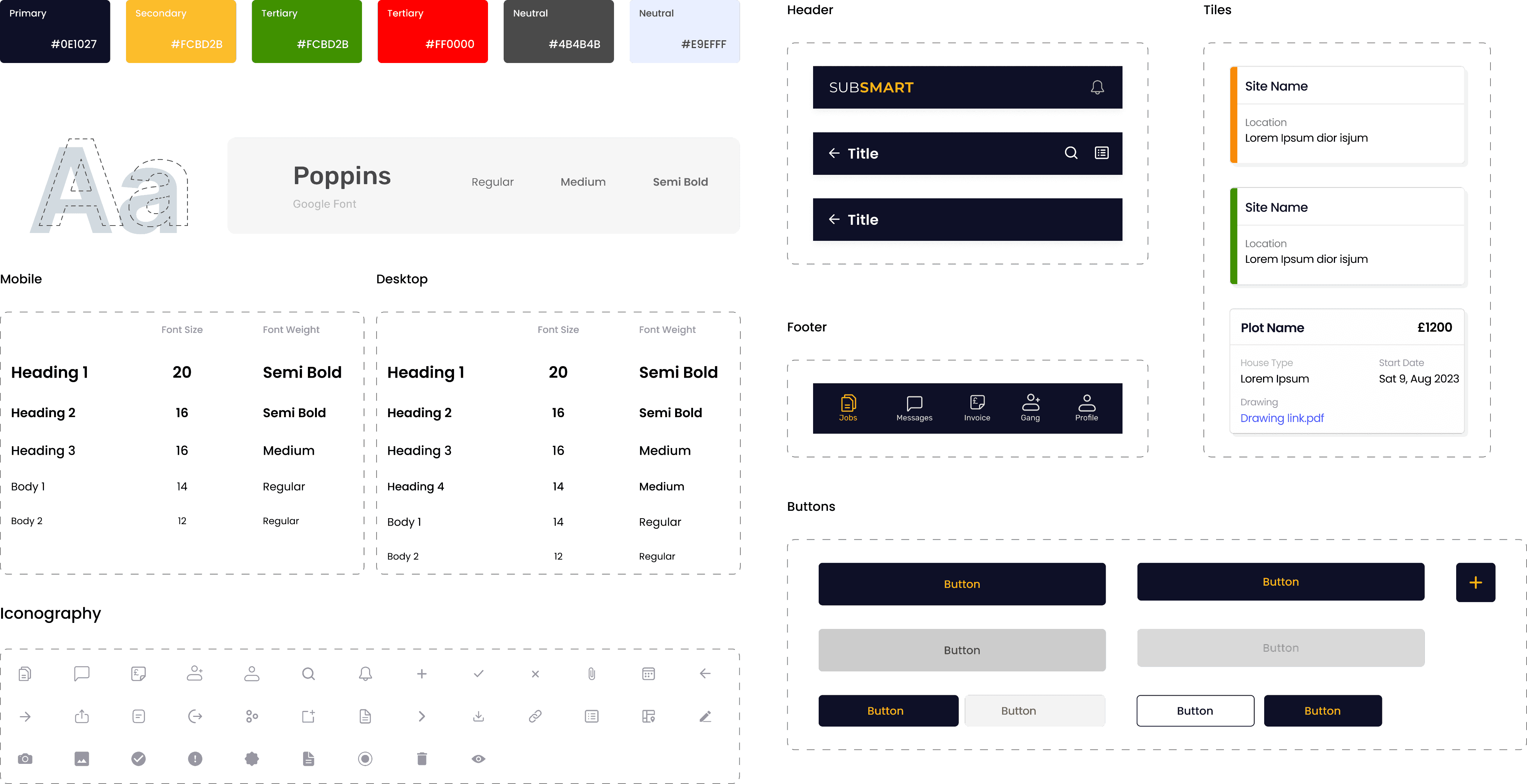
I created a colour palette with 1 primary, 2 secondary and 3 neutral colours. The choice for typography has fallen on Poppins font with a decent x-height for legibility. Created a components of header, tiles, footer, buttons and icons.
With those elements added to my low fidelity wireframes, I made my way into high-fidelity designs.
UI Components Library
I created a colour palette with 1 primary, 2 secondary and 3 neutral colours. The choice for typography has fallen on Poppins font with a decent x-height for legibility. Created a components of header, tiles, footer, buttons and icons.
With those elements added to my low fidelity wireframes, I made my way into high-fidelity designs.
Hi-Fi Designs
After successful session on wireframes and colour palette, I started working on designing Hi-Fi designs.
Clear visibility of key areas of business to streamline the admin work.
Managing jobs on paper manually and keeping an eye on all aspects of business was time consuming and hard to remember everything.
With Subsmart, admin can now easily manage and track all the jobs, messages, site records and invoices on the main dashboard of the web app.
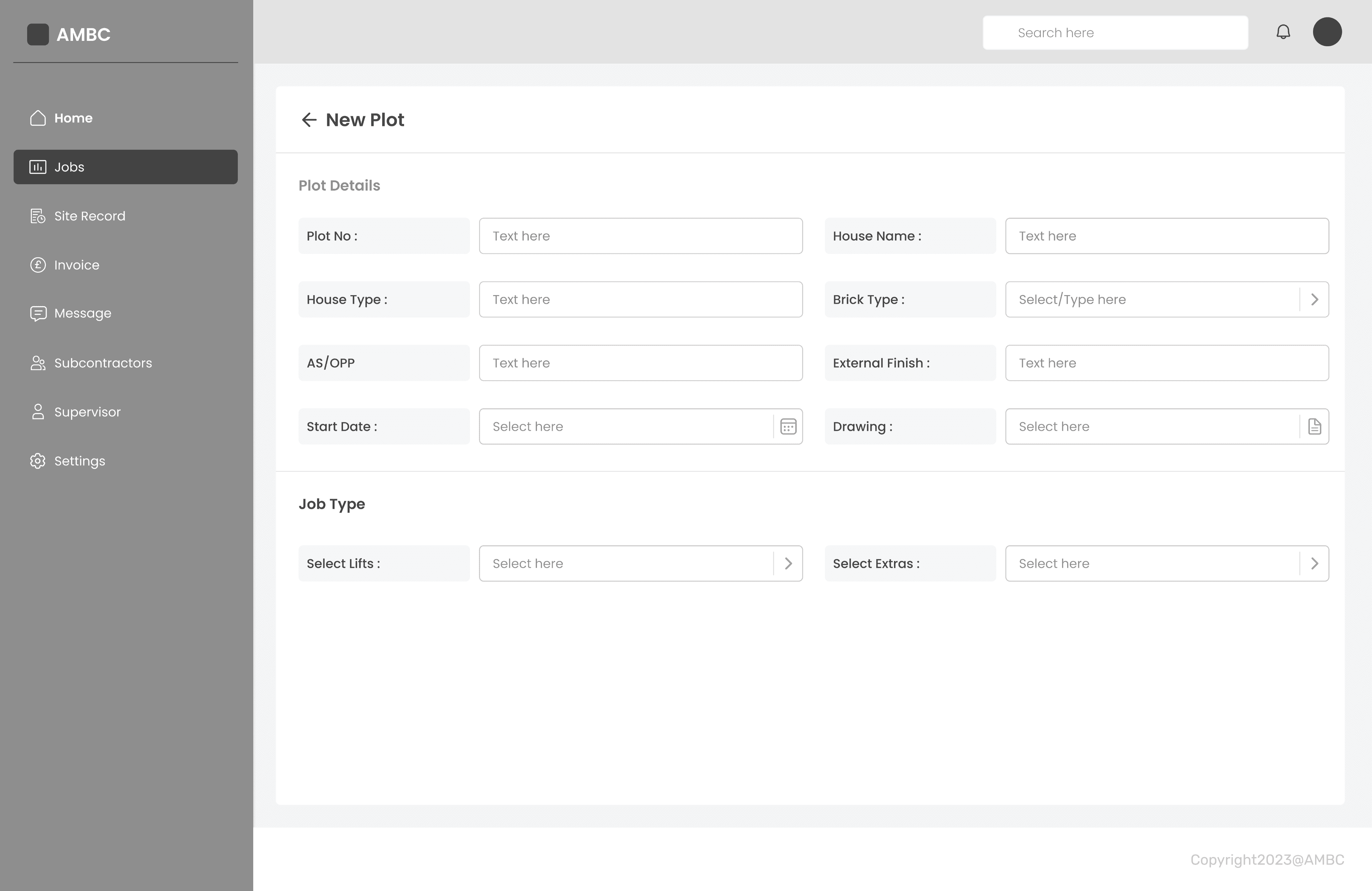
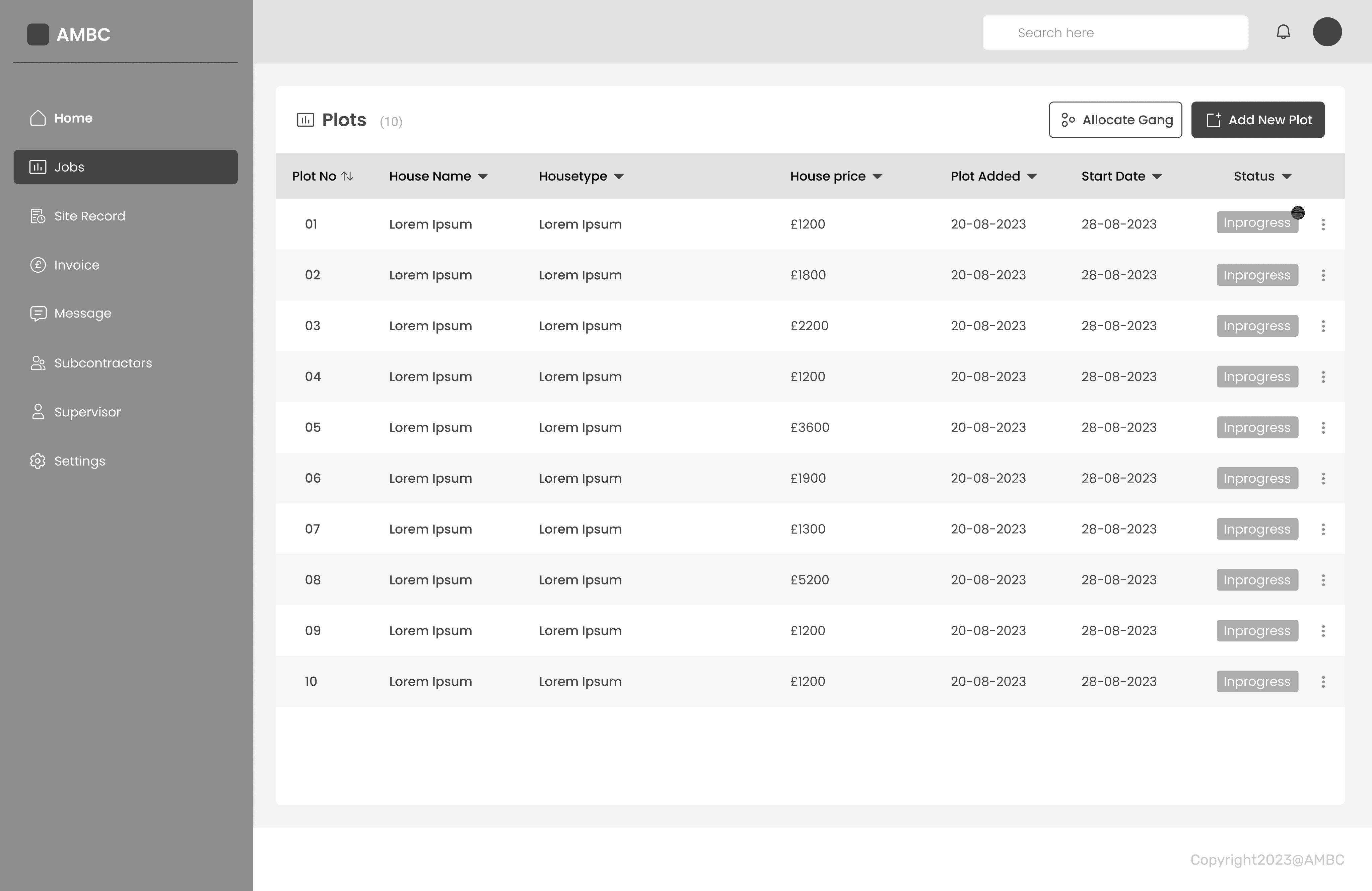
Adding new sites & keeping record of it is now much easier.
Preparing and sharing a new list of sites with the subcontractors took considerable time.
Admin now can create sites in the web app and easily share and allocate worker to the site reducing extra effort and time.
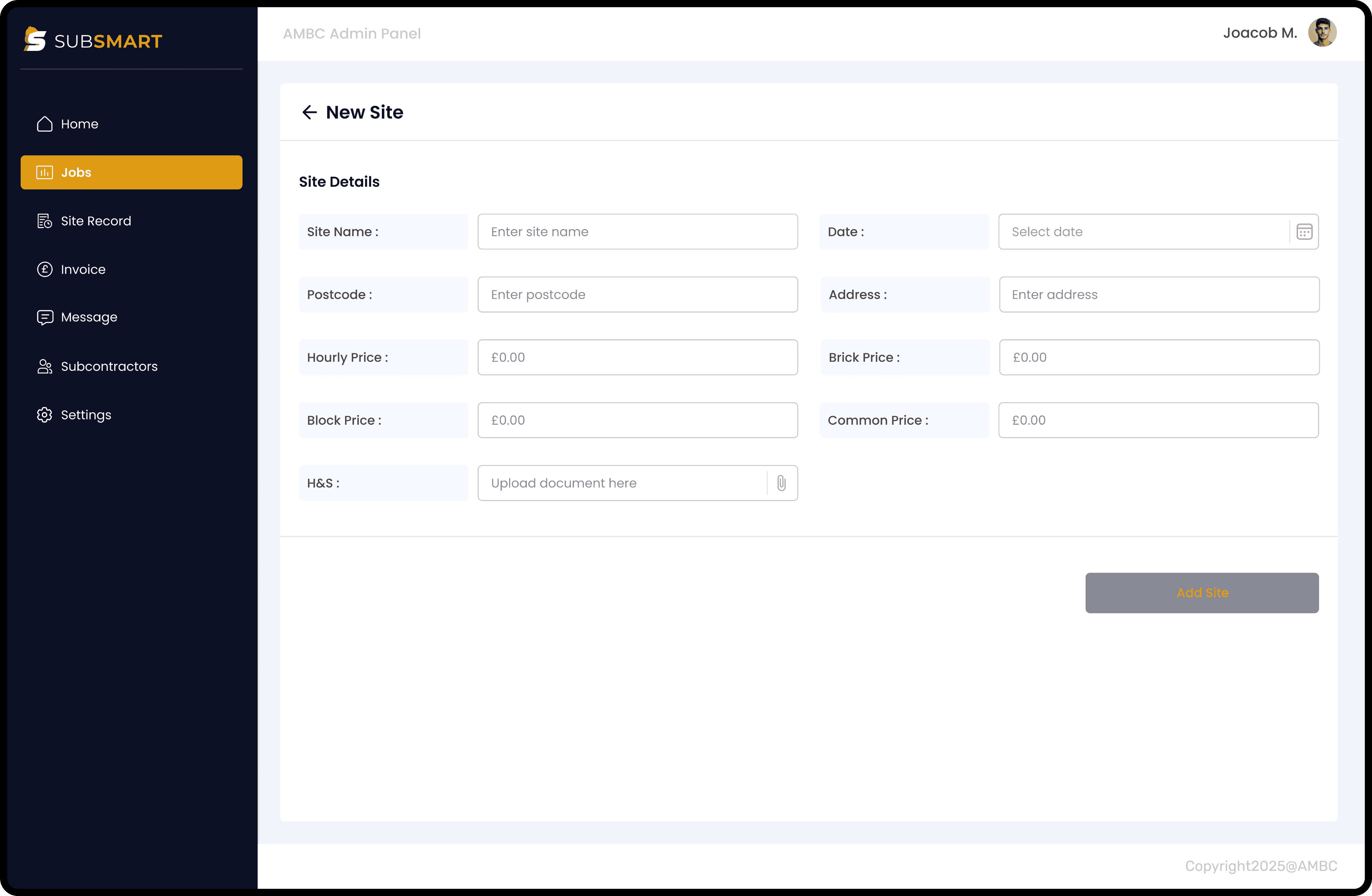
No more pen & paper required.
Bricklayers now can easily get access to the new sites added and can effortlessly mark the work progress without noting down on any paper.
This way they can keep the track of work done and record the completed work on site.
QA Testing
Internal QA Testing
Overall, internal figma testing was quite satisfying. All the flows were working as expected and it was also made sure that the UI design is pixel perfect.
Figma prototype was tested with Bricklayers and Supervisor and received positive feedback. There were minor tweaks which were updated in design.
Design Handover
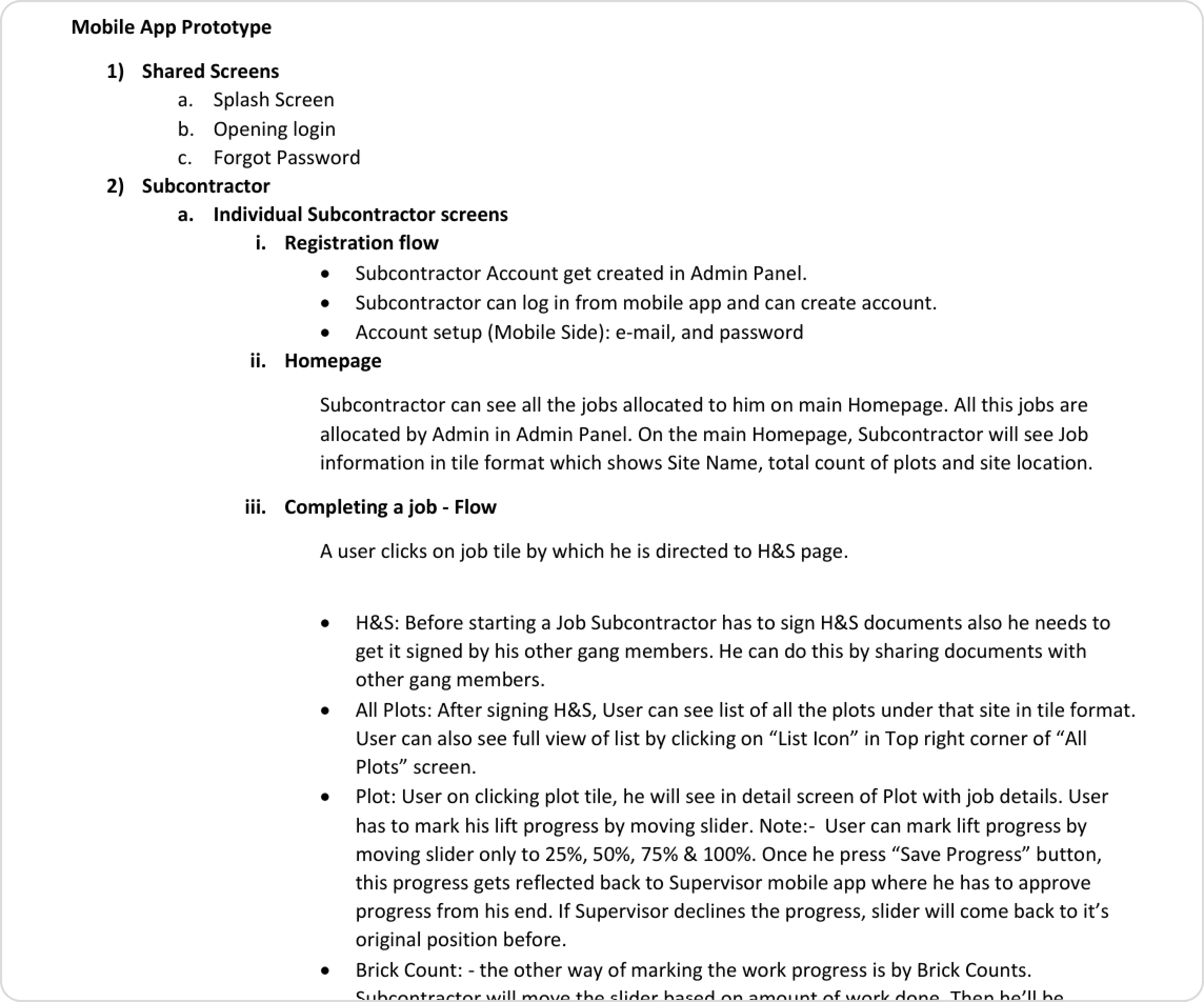
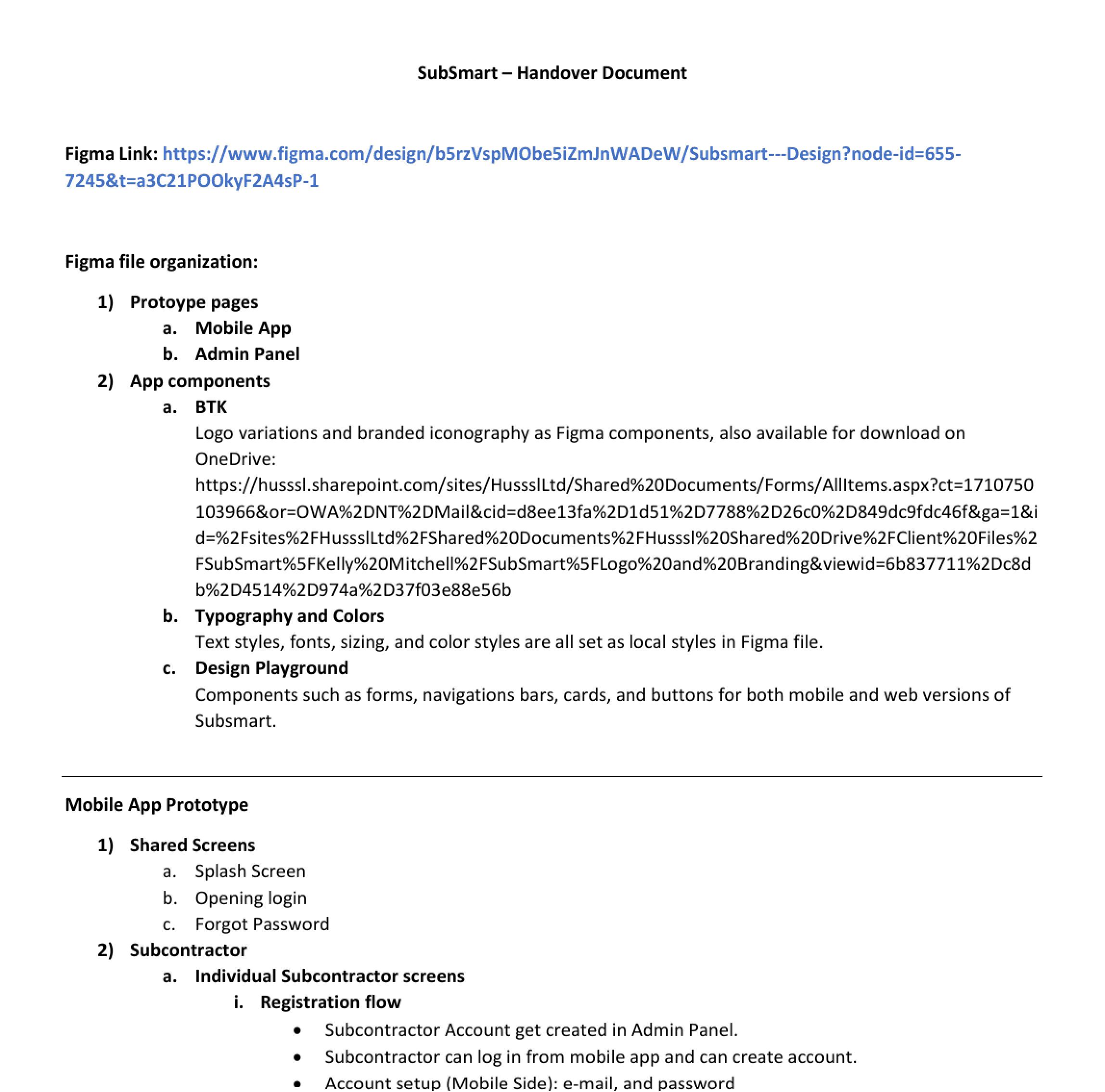
The handover document was created with the recordings explaining each and every functionality in the flow. The prototype was also added which majorly helped in the handover meeting as it was easier to explain the process to the dev team.
A separate handover document was created with added annotations and explanation of each screen. The project handover was made in four phases covering all the core features of Subcontractors mobile app, Supervisors mobile app and Admin panel.
Key Takeaways
What needs to be improved
1
Need to look into simplifying feature of switching between Brick count and Normal Lifts.
2
Need to simplify the process of allocating gangs to the plot as this will save time of the Admin.
3
It would be useful to just keep invoice history in “Invoice” section rather than creating invoice agai.
Challenges:
To find the right angle together as a team with an interesting user experience when dealing with a business to business client.
To cope up with different scenarios and multiple user types without making the flow complicated and boring.
To think about detailed aspects users might need when designing flows for all user types.
Lesson learnt:
Seek out feedback early and continually
The trouble with most of us is that we would rather be ruined by praise than saved by criticism. Keeping the stakeholders/users in loop and testing solutions in whatever form (paper, low-fi or hi-fi) as early as possible saves ample amount of time and re-work.
Simplicity is strength
As a designer, we are often lured by attractive, trendy and out of the box designs. But, we must always remember the ‘why’. The primary goal is to understand the user, their problems and then come up with a design that solves it.
Prioritize
Create a design strategy before starting any new project. This helps deal with out-of-scope requests that could potentially derail the project and helps deliver a quality product in time.
Research and discovery
Six people were interviewed: 4 Bricklayers, 1 Gang leader, 1 Site supervisor. User interviews were conducted on site of a client.
Key features
Bricklayers/Subcontractors (Mobile App)
Profile creation
Ability to create profile for site managers.
Job submission
Ability to submit lifts / jobs for approval.
Site Manager (Mobile App)
Approval
Ability to review & approve complete lifts/jobs.
Amend progress
Ability to amend progress of lifts/jobs submitted.
Admin panel (Web app)
Expiry reminders
CSCS, UTR and CIS check and ability to send reminders when expiring.
Property details
Ability to input a plot number, input price list for jobs, the total cost for house build.
User personas & scenarios
Created 2 primary personas & scenarios based on the research and survey outcome to keep design decision user centric.
Survey outcome
Manual process
Bricklayer record the completion of work on paper. It’s difficult to handle paper copy during bad whether or due to the wet site conditions.
Time consuming
Time consuming for supervisor to mark and approve work done.
Manual process of calculation and creating invoice.
Document check
Hard for gang leader to keep record of all bricklayers. Often need to check expiry of all the bricklayers document and update information with Admin.
designwithyuvraj@2025
designwithyuvraj@2025